For Google Workspace teams
Know where your
team will be
wya syncs with your organization's calendars to show who's out of office, working remotely, or traveling.
By signing in, you agree to our Terms & Privacy Policy
How it works
1
Connect Google Workspace
Your workspace admin adds wya to Google Workspace. Teammates are added automatically.
2
We scan for keywords
Calendar events with “OOO”, “WF”, and other common patterns are found and displayed in the grid.
3
See statuses
Quickly see who will be out of office, working remotely, or traveling. The grid is updated as calendars change.
| Jul 13–17 | Jul 20–24 | Jul 27–31 | Aug 3–7 | Aug 10–14 | Aug 17–21 | Aug 24–28 | Aug 31 – Sep 4 | |||||||||||||||||||||||||||||||||
|---|---|---|---|---|---|---|---|---|---|---|---|---|---|---|---|---|---|---|---|---|---|---|---|---|---|---|---|---|---|---|---|---|---|---|---|---|---|---|---|---|
| Name | Mon 13 | Tue 14 | Wed 15 | Thu 16 | Fri 17 | Mon 20 | Tue 21 | Wed 22 | Thu 23 | Fri 24 | Mon 27 | Tue 28 | Wed 29 | Thu 30 | Fri 31 | Mon 3 | Tue 4 | Wed 5 | Thu 6 | Fri 7 | Mon 10 | Tue 11 | Wed 12 | Thu 13 | Fri 14 | Mon 17 | Tue 18 | Wed 19 | Thu 20 | Fri 21 | Mon 24 | Tue 25 | Wed 26 | Thu 27 | Fri 28 | Mon 31 | Tue 1 | Wed 2 | Thu 3 | Fri 4 |
A Ada LovelaceDirector | Field work | WFH | Field work | Babbage's Study | Ockham Park | 10-3p | Babbage's Study | |||||||||||||||||||||||||||||||||
A Alan TuringFellow | 10-3p | Bletchley Park | Conference | Manchester | OOO | OOO | OOO | |||||||||||||||||||||||||||||||||
G Grace HopperFellow | Arlington | Arlington | Arlington | Conference | WFH | Arlington | Pentagon | |||||||||||||||||||||||||||||||||
S Stephen HawkingProfessor | OOO | DAMTP | 2-5p | Conference | WFH | DAMTP | OOO | OOO | OOO | |||||||||||||||||||||||||||||||
R Richard FeynmanProfessor | Caltech | Conference | 9-1p | 9-1p | Caltech | JPL | 9-12p | OOO | Conference | Caltech | Caltech | WFH | ||||||||||||||||||||||||||||
C Charles DarwinDirector | WFH | WFH | Museum | Museum | OOO | Galapagos | Galapagos | Galapagos | Galapagos | Galapagos | Galapagos | Galapagos | Galapagos | Galapagos | Galapagos | |||||||||||||||||||||||||
R Rosalind FranklinFellow | King's College | X-Ray Lab | King's College | Birkbeck | Birkbeck | Birkbeck | ||||||||||||||||||||||||||||||||||
L Louis PasteurResearcher | 2-5p | Strasbourg | WFH | Conference | Brewery | WFH | ||||||||||||||||||||||||||||||||||
J Jane GoodallResearcher | Gombe | Gombe | Gombe | Gombe | Gombe | Gombe | Gombe | Gombe | Gombe | Gombe | Gombe | Gombe | Gombe | Gombe | Gombe | OOO | OOO | |||||||||||||||||||||||
A Alexander FlemingResearcher | WFH | OOO | Chelsea | OOO | Chelsea | Field work | Conference | |||||||||||||||||||||||||||||||||
A Albert EinsteinDirector | 10-3p | WFH | OOO | Patent Office | 9-12p | OOO | Princeton | |||||||||||||||||||||||||||||||||
N Nikola TeslaFellow | Lab | Wardenclyffe | WFH | Wardenclyffe | Lab | Lab | OOO | 10-3p | OOO | Conference | ||||||||||||||||||||||||||||||
I Isaac NewtonProfessor | WFH | 2-5p | WFH | Cambridge | Cambridge | Cambridge | Conference | Observatory | Woolsthorpe | Conference | Field work | |||||||||||||||||||||||||||||
G Galileo GalileiProfessor | 10-3p | Observatory | WFH | Florence | ||||||||||||||||||||||||||||||||||||
M Marie CurieResearcher | Paris Lab | Institut du Radium | Sorbonne | Sorbonne | 9-12p | OOO | Paris Lab | 2-5p | Paris Lab | |||||||||||||||||||||||||||||||
Google Workspace Setup
Follow these steps to connect your organization to wya.
Prerequisites
- You must be a Google Workspace Super Admin
- Your organization must be on Google Workspace (Business, Enterprise, or Education)
1
Open Domain-Wide Delegation Settings
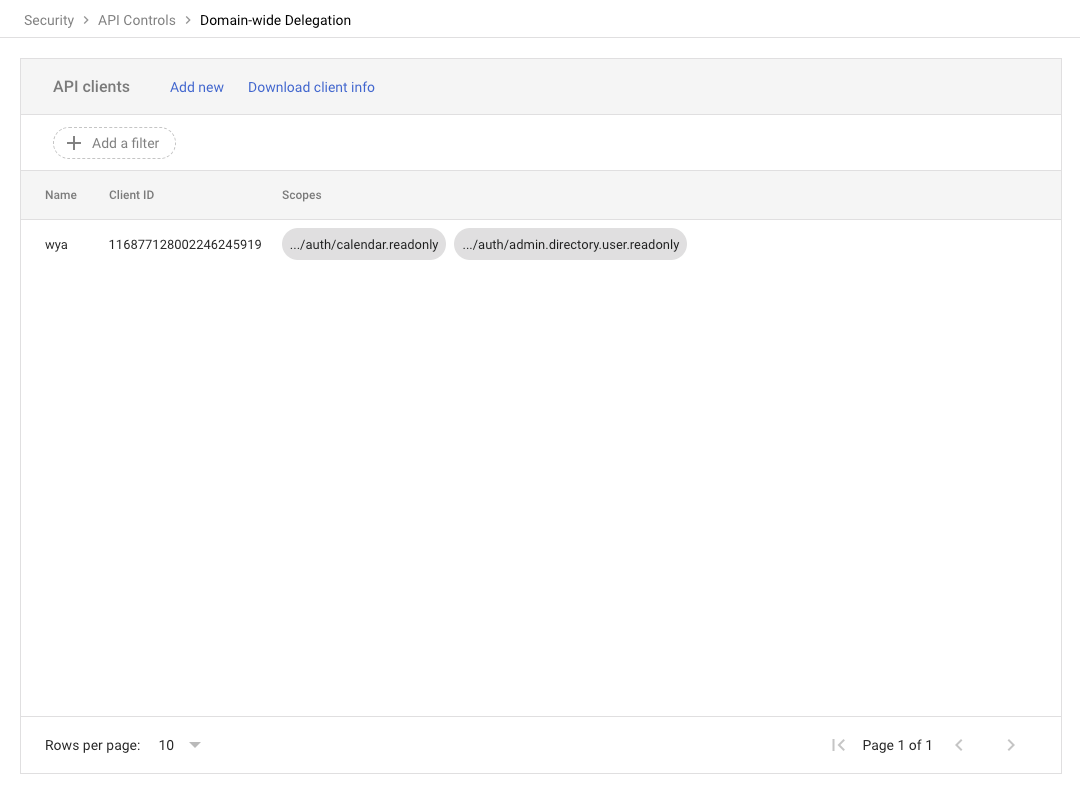
- Go to Google Admin Console > Security > Access and data control > API Controls > Manage Domain Wide Delegation
- Click Add new
2
Add wya Service Account
Client ID
116877128002246245919OAuth scopes (comma-delimited)
https://www.googleapis.com/auth/calendar.readonly,https://www.googleapis.com/auth/admin.directory.user.readonlyLeave "Overwrite existing client ID" unchecked.
3
Click Authorize
After clicking Authorize, the service account will have read-only access to calendars and user directory for your domain.
4
Verify Connection
Click below to verify the connection is working with your account:
to verify connection
What wya can access
| calendar.readonly | Read OOO and working location events |
| admin.directory.user.readonly | List users in your organization |
Security
- wya only has read access - we cannot modify your data
- You can revoke access anytime from Google Admin Console
- All data is encrypted in transit and at rest